Canva for Beginners: How to Unlock Your Creative Potential
Date: 2026-03-13 10:06:31
Canva is one of the most popular graphic design tools available today, designed to make visual creation accessible to everyone. Whether you’re a beginner exploring digital design for the first time, a teacher looking for engaging classroom materials, or a business owner needing marketing graphics, Canva offers a platform that simplifies the creative process without compromising on quality.
Getting Started with Canva
The first step to using Canva is setting up a Canva Account. Signing up is quick and easy — you can register using your email, Google account, or even Facebook login. Once your account is active, you’ll be guided through options that tailor the experience based on whether you’re a teacher, student, professional, or hobbyist. This customization makes it simpler to navigate Canva and quickly find the tools and templates relevant to your needs.
Canva works seamlessly on web browsers, iOS, and Android apps, meaning you can create designs anytime, anywhere. The platform’s intuitive drag-and-drop interface is designed for beginners, allowing you to easily move images, shapes, text, and other design elements around the canvas without any prior design experience.
Why Canva Is Beginner-Friendly
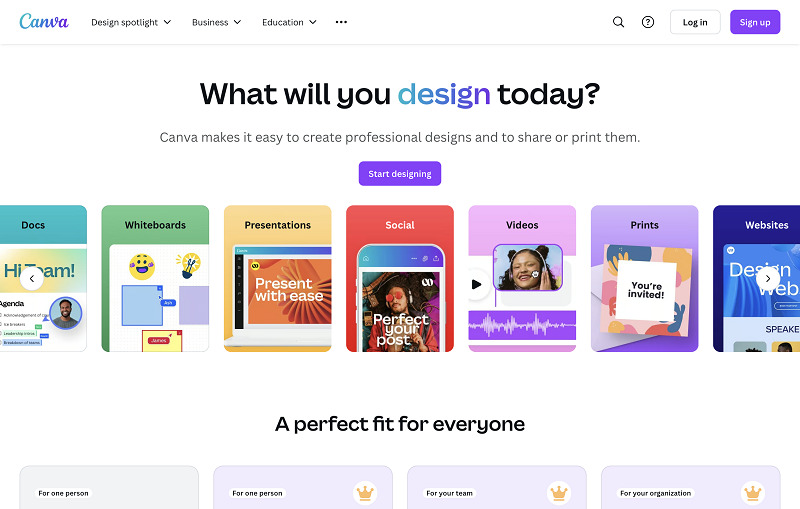
Canva’s biggest strength lies in its accessibility. Unlike traditional design software that may require formal training or technical knowledge, Canva removes the learning barrier. From the moment you log in, you can start with pre-made templates for social media posts, posters, flyers, presentations, or logos. Every template can be customized — colors, fonts, images, and layouts can be changed with just a few clicks.
For marketing professionals, Canva is particularly effective because it allows consistent branding across different assets. You can save brand colors, fonts, and logos to create a unified look for all your visuals. For educators, Canva’s collaborative features allow students to work on group projects, submit assignments, and create learning portfolios.
Exploring Canva’s Features
Templates and Assets
Canva offers over 250,000 templates, plus an extensive library of stock photos, videos, icons, and graphics. Even without a premium plan, users have access to thousands of assets to create polished designs. With Cheap Canva Subscription, you unlock additional premium features, including access to millions more images, advanced animations, custom fonts, and enhanced collaboration tools.
AI-Powered Design
Canva has integrated artificial intelligence tools to make design smarter and faster. Features like Magic Write, Magic Edit, and Magic Design help with copywriting, content editing, and automatic layout generation. Background removal, AI-generated image suggestions, and style recommendations further streamline the creative process. For beginners, these AI tools make it possible to produce professional-looking designs in minutes without worrying about advanced techniques.
Collaboration and Sharing
One of Canva’s standout features is its collaboration capability. Teams can work together in real time, leave comments, and organize assets efficiently. Teachers can set up class projects, while businesses can maintain brand consistency across multiple campaigns. Designs can be exported in various formats, shared directly on social media, or sent to professional print services.
Time-Saving Tools
Canva offers several features that save time while ensuring professional results. Magic Resize allows you to adjust a design for multiple platforms in one click. The one-click background remover instantly separates subjects from their background, and design grids and templates make layout planning easy.
Creating Projects with Canva
For beginners, Canva is an ideal platform for hands-on, project-based learning. Instead of getting bogged down by complex design software, users can start with a template and immediately begin experimenting with layouts, colors, and text. Whether you’re designing a social media post, a presentation, or a personal project, Canva allows you to explore creativity while achieving polished results.
Starting with a template provides structure, so beginners can focus on content rather than formatting. You can customize images, fonts, and graphics to match your vision, or upload your own assets to make the design uniquely yours. Charts, infographics, and diagrams can also be added to communicate information clearly, making it easy to visualize data or tell a story in any project.
Practical Tips for Beginners
- Experiment Freely: Spend time exploring templates, assets, and AI tools. The more you try, the more comfortable you’ll become.
- Plan Your Projects: Use Canva to create visual layouts for your lessons, marketing campaigns, or social media strategies.
- Leverage Collaboration: Invite team members or students to co-create designs for faster and more interactive workflows.
- Focus on Learning Portfolios: Encourage students to maintain Canva projects as part of a digital portfolio, showinhearogress and achievements.
- Use Templates Smartly: Start with a template, then customize it to suit your brand, topic, or personal style.
Why Upgrade with Canva Subscription
While the free version of Canva is powerful on its own, a Canva Subscription unlocks advanced features such as premium stock images, brand kits, unlimited folders, and more. Subscriptions are ideal for businesses, educators, or frequent creators who need access to enhanced design resources and team collaboration tools.
Conclusion
Canva is a versatile design tool that makes creating professional-quality visuals achievable for anyone, regardless of experience. With Buy Canva Account, you can explore thousands of templates, use AI-powered tools, and collaborate efficiently. Whether you’re crafting social media content, preparing classroom projects, or designing marketing materials, Canva equips you with everything you need to bring your ideas to life. Upgrading to a Canva Subscription can further enhance your capabilities, giving you more creative freedom and advanced resources to expand your design potential.


